
DNS (Domain Name System) is the internet’s address book. It translates easy-to-remember domain names such as example.com into numerical IP addresses that computers use to communicate. Without DNS, users would need to remember long IP addresses instead of simple website names.
When you type a domain name into your browser, a series of servers work together to resolve it – your device checks its local cache, then queries a recursive resolver (usually provided by your ISP or a public DNS like Google’s 8.8.8.8), which then contacts root servers, TLD servers, and finally authoritative name servers to get the correct IP address. All this happens in milliseconds.
DNS also supports various record types: A records for IPv4 addresses, AAAA for IPv6, CNAME for aliases, MX for email routing, and TXT for verification and security. This guide covers everything beginners need to know about DNS.
What Is DNS?
When you type a website name into your browser, something magical happens behind the scenes. You type google.com, and within seconds, the page loads. But how does your computer know where to find Google’s servers?
The answer is DNS – the Domain Name System. DNS is the system that translates human-readable domain names into the numerical IP addresses computers use to find each other online. Think of it as the internet’s phonebook. Instead of remembering a long IP address like 172.217.3.110, you just type google.com, and DNS figures out the right address for you.
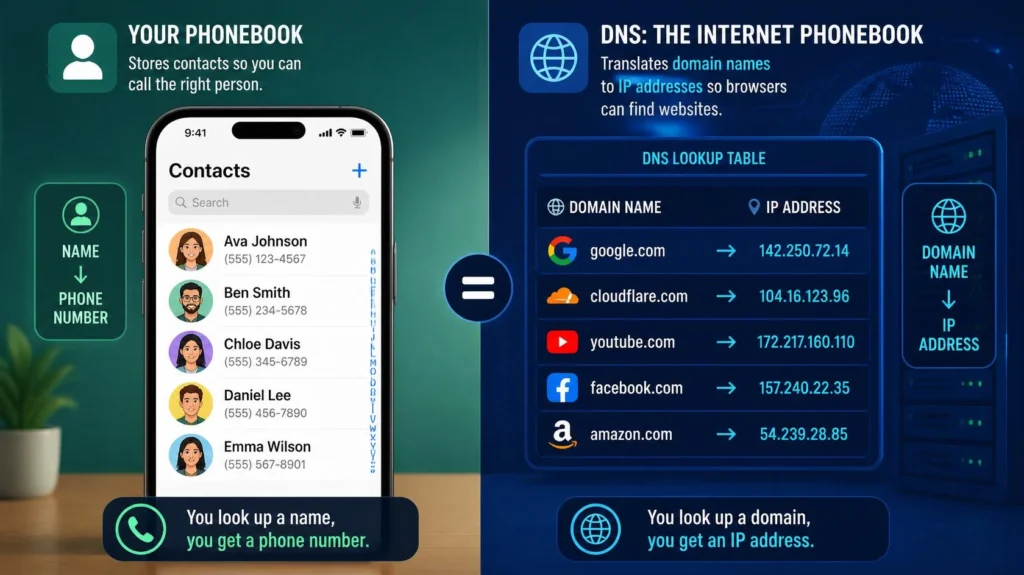
Real-World Analogy: Think of DNS like your phone’s contacts app. You tap on “Mom” and your phone knows it should dial a specific phone number. DNS does the same — you type amazon.com, and it finds the server’s IP address so your browser can connect to it.
How DNS Works
The DNS Resolution Process – Step by Step
When you type a domain name into your browser, a series of steps happens in milliseconds to get you to the right website. Here is what happens :
Step 1: Local DNS Cache Check
Your device first checks if it already knows the IP address from its local DNS cache. If you have visited the site recently, your browser or operating system may have the IP address stored in memory and will take you straight to the website without further lookups.
Step 2: Recursive DNS Resolver Query
If the domain is not in the local cache, your device sends a query to a recursive DNS resolver. This resolver is typically provided by your Internet Service Provider (ISP), but you can also use public DNS services like Google’s 8.8.8.8 or Cloudflare’s 1.1.1.1. The recursive resolver does the legwork of finding the IP address on your behalf.
Step 3: Root Name Server Query
If the resolver doesn’t have the information cached, it contacts a root name server. Root servers are at the top of the DNS hierarchy. They don’t know the IP address of example.com, but they know where to find the servers responsible for the Top-Level Domain (TLD) – in this case, the .com TLD server. The root server responds with the IP addresses of the .com TLD name servers.
Step 4: Top-Level Domain (TLD) Name Server Query
The recursive resolver then queries the .com TLD name server. This server handles all domains ending in .com. It knows which authoritative name servers are responsible for the specific domain you are looking for and provides their IP addresses.
Step 5: Authoritative Name Server Query
Finally, the recursive resolver queries the authoritative name server for the domain. This server contains the actual DNS records for the domain, including the IP address. It responds with the correct IP address for the domain you requested.
Step 6: Website Loads
The recursive resolver returns the IP address to your browser, which can now connect to the website’s server and load the page. The resolver also caches this information for a specific period (defined by the Time-To-Live, or TTL) to speed up future requests for the same domain.
Explore more about Which Hosting Is Best? Shared Hosting vs VPS vs Cloud Hosting Explained
Types of DNS Servers
The DNS ecosystem is composed of several types of servers, each with a distinct role :
| Server Type | Role |
|---|---|
| Recursive DNS Resolver | The first server your device contacts directly. It does the legwork of finding the right IP address and delivers the answer back to your browser. |
| Root Name Server | The top of the DNS hierarchy. It doesn’t know the IP address you need, but it points the resolver to the correct TLD server. There are 13 clusters of root servers globally. |
| TLD Name Server | Handles a specific group of domains, like .com or .org. It knows where to find the authoritative server for the domain you’re trying to reach. |
| Authoritative Name Server | Contains the actual DNS records for a domain, including the IP address. This is the final stop in the resolution process. |
Types of DNS Queries
DNS queries can be classified into three types :
| Query Type | Description |
|---|---|
| Recursive Query | Your device asks a DNS resolver to return the final answer – no matter how many other servers it has to contact. The resolver handles all the heavy lifting. |
| Iterative Query | The resolver asks each DNS server for the best answer it can give. If a server doesn’t have the final answer, it points to the next server to try. This continues until the resolver reaches the authoritative server. |
| Non-recursive Query | The fastest kind – the resolver already has the IP address cached and ready to go. There is no need to contact any other servers. |
Common DNS Records Explained
DNS records are the building blocks of how domain names are managed. Here are the most common types :
| Record Type | Purpose | Example |
|---|---|---|
| A Record | Maps a domain name to an IPv4 address | example.com → 192.0.2.1 |
| AAAA Record | Maps a domain name to an IPv6 address | example.com → 2001:0db8:85a3:0000:0000:8a2e:0370:7334 |
| CNAME Record | Creates an alias – points one domain name to another domain name | www.example.com → example.com |
| MX Record | Routes email to mail servers | example.com → mail.example.com (priority 10) |
| TXT Record | Stores text information for verification, SPF, and DMARC | v=spf1 include:_spf.google.com ~all |
| NS Record | Specifies the authoritative name servers for a domain | ns1.example.com, ns2.example.com |
| SOA Record | Contains administrative information about the zone | Start of Authority record |
DNS Security and Common Threats
DNS wasn’t designed with security in mind – it was designed to be fast and flexible. That leaves the door open for attacks.
| Attack Type | Description |
|---|---|
| DNS Spoofing | Attackers replace the correct IP address in DNS responses with a false one, tricking users into visiting fake websites. |
| DNS Cache Poisoning | Attackers inject fake information into a DNS cache. Once poisoned, the cache sends users to malicious websites – even when they enter the correct domain name. |
| DNS Hijacking | Attackers redirect users to malicious sites by altering how DNS queries are resolved. |
| DNS Tunneling | Hides malicious data inside DNS queries to bypass security tools. |
How to Protect Your DNS Queries:
- DNSSEC helps verify that DNS responses haven’t been tampered with.
- DNS over HTTPS (DoH) and DNS over TLS (DoT) encrypt your DNS traffic, preventing snooping and man-in-the-middle attacks.
- Use trusted DNS providers like Cloudflare (
1.1.1.1) or Google Public DNS (8.8.8.8) for faster and more secure resolution.
People Also Ask
What is DNS in simple terms?
DNS is the internet’s phonebook. It translates human-readable domain names like google.com into numerical IP addresses that computers use to find each other.
How does DNS work for beginners?
When you type a domain name, your device checks its local cache, then asks a DNS resolver. The resolver contacts root servers, TLD servers, and finally authoritative servers to get the IP address. The whole process takes milliseconds.
What is a recursive DNS resolver?
It’s the middleman that finds the IP address for you by asking other DNS servers. It does the legwork so you don’t have to.
What is the difference between a recursive and an authoritative DNS server?
Recursive servers do the searching. Authoritative servers hold the actual DNS records and provide the final answer.
Can I change my DNS provider?
Yes. You can use faster or more private DNS providers like Cloudflare (1.1.1.1), Google Public DNS (8.8.8.8), or Quad9 (9.9.9.9) instead of your ISP’s default DNS.

